
Entertainment
How to Upload Music to Spotify and Apple Music: A Step-by-Step Guide for Independent Artists


Post Links
The music industry has transformed dramatically with the rise of streaming platforms like Spotify and Apple Music. These platforms have become essential for artists looking to share their music with a global audience. With over 615 million monthly active users on Spotify and 90 million subscribers on Apple Music, getting your music on these platforms is a crucial step for any independent artist aiming to build a fanbase, earn royalties, and gain exposure. However, uploading music to these platforms isn’t as simple as uploading a file to social media.
It requires working with a digital music distributor and optimizing your release for maximum discoverability. In this comprehensive guide, we will walk you through the step-by-step process of uploading your music to Spotify and Apple Music, share tips for success, and highlight how to leverage SEO for music streaming to boost your visibility.

Why Upload Music to Spotify and Apple Music?
Before diving into the how-to, let’s explore why these platforms are worth your time. Spotify is the leading music streaming service, hosting over 100 million tracks and boasting a massive user base. Apple Music, while slightly smaller, offers superior audio quality and higher royalty payouts, making it a favorite among artists. Both platforms provide tools like Spotify for Artists and Apple Music for Artists, which offer real-time analytics, playlist pitching opportunities, and profile customization to help you grow your career.
Uploading your music to these platforms allows you to:
- Reach a global audience: Connect with millions of listeners worldwide.
- Earn royalties: Get paid every time your music is streamed.
- Build a fanbase: Use analytics to understand your audience and plan tours or releases.
- Gain exposure: Land on curated playlists or algorithmic recommendations to attract new listeners.
However, neither Spotify nor Apple Music allows direct uploads from independent artists. You will need to work with a music distribution platform to get your tracks live. Let’s break down the process.
Step-by-Step Guide to Uploading Music to Spotify and Apple Music
Step 1: Prepare Your Music and Metadata
Before you even think about uploading, ensure your music is ready for distribution. This means your tracks should be professionally recorded, mixed, and mastered to meet industry standards. Spotify normalizes audio to -14 dB LUFS, so ensure your tracks sound polished alongside other professional releases. Poor audio quality can turn listeners away and harm your reputation.
Next, prepare your metadata, which includes:
- Track title and artist name: Ensure consistency across platforms.
- Album/EP name: If releasing multiple tracks.
- Genre and subgenre: This helps algorithms categorize your music.
- Release date: Choose a date at least 7-14 days in the future to allow for distribution and playlist pitching.
- Collaborators: List producers, songwriters, or featured artists to ensure proper credits.
- Cover art: Spotify and Apple Music require high-quality artwork (minimum 640×640 pixels for Spotify, 3000×3000 pixels for Apple Music) in TIFF, PNG, or JPG format. Avoid explicit content or text-heavy designs to meet platform guidelines.
Proper metadata is critical for SEO for music streaming. Including relevant keywords in your track titles, artist bio, and descriptions can improve discoverability when listeners search for specific genres or vibes.
Step 2: Choose a Music Distribution Platform
Since Spotify and Apple Music don’t allow direct uploads, you will need to partner with a music distribution platform. These services act as intermediaries, delivering your music to streaming platforms and collecting royalties on your behalf. Here are some popular options:
- TuneCore: Offers distribution to over 150 platforms, including Spotify and Apple Music, for a one-time fee per release. You keep 100% of your royalties.
- DistroKid: A subscription-based service that allows unlimited uploads for a yearly fee. It’s a Spotify-preferred partner and offers fast distribution.
- CD Baby: Charges a one-time fee of $9.99 per release with no subscription costs. It takes a 9% royalty cut but distributes to 150+ platforms.
- RouteNote: Offers free distribution with an 85% royalty share or a premium plan with 100% royalties. Ideal for artists on a budget.
- iMusician: A flexible option with no annual fees, allowing you to distribute to Spotify and other platforms with customizable plans.
When choosing a distributor, consider factors like cost, royalty splits, speed of distribution, and additional features like playlist pitching or analytics. For example, TuneCore and DistroKid are great for frequent releasers, while CD Baby suits artists with infrequent releases.
Step 3: Sign Up and Create Your Release
Once you have chosen a distributor, sign up for an account on their website. Most platforms have a straightforward process:
- Create an account: Provide your details and payment information (if applicable).
- Start a release: Select whether you are uploading a single, EP, or album.
- Upload your files: Upload your music in WAV or FLAC format for the best quality. Also, upload your cover art and input metadata like track titles, artist names, and release dates.
- Add contributors: Credit any collaborators to ensure they receive royalties and recognition.
- Select platforms: Choose Spotify, Apple Music, and other platforms where you want your music distributed.
Double-check all details to avoid errors, as incorrect metadata can delay your release or cause issues with royalty payments.
UK Tiktok Creation Blueprint with Monetization tips and Coaching – How to create a U.K. tiktok account

Step 4: Submit Your Release for Review
After uploading your files and metadata, submit your release for review. Most distributors have a quality assurance (QA) team that checks for issues like audio quality, metadata accuracy, or guideline violations. This process typically takes 1-5 days, but during peak periods (like holidays), it may take longer.
Once approved, your distributor will send your music to Spotify and Apple Music. Spotify typically takes 24-48 hours to make your music live, while Apple Music may take a few days longer.
Step 5: Claim Your Artist Profiles
After your music is live, claim your Spotify for Artists and Apple Music for Artists profiles to gain access to powerful tools:
- Spotify for Artists: Customize your bio, add high-quality images, pitch tracks to editorial playlists, and track real-time streaming data. You can also promote upcoming gigs or merchandise.
- Apple Music for Artists: Monitor analytics, update your profile, and connect with fans through personalized playlists and artist updates.
To claim your profiles, verify your identity through your distributor or social media accounts. This step is crucial for managing your presence and optimizing SEO for music streaming.
Step 6: Optimize for SEO and Promote Your Music
To maximize your reach, incorporate SEO for music streaming strategies:
- Use keywords: Include descriptive words in your artist bio, track titles, and playlist descriptions that reflect your genre or vibe (e.g., “indie pop,” “chill lo-fi,” “workout beats”). Research keywords by analyzing popular playlists in your genre.
- Create playlists: Build keyword-rich playlists on Spotify to increase visibility. For example, a playlist titled “Chill Indie Vibes 2025” can attract listeners searching for similar terms.
- Promote on social media: Share teasers, music videos, or countdowns on platforms like Instagram, TikTok, and X to build anticipation. Link directly to your Spotify or Apple Music tracks to drive streams.
- Engage with fans: Use Spotify for Artists and Apple Music for Artists analytics to understand your audience’s demographics and preferences. Tailor your promotion to target specific regions or listener groups.
Step 7: Monitor Performance and Earn Royalties
Once your music is live, track its performance using Spotify for Artists and Apple Music for Artists. These tools provide insights into streams, listener demographics, and playlist placements. Use this data to refine your marketing strategy or plan future releases.
Royalties are paid based on streams, with Spotify paying approximately $0.003-$0.005 per stream and Apple Music offering slightly higher rates. Your distributor will collect and distribute these royalties, minus any applicable fees.
Tips for Success on Spotify and Apple Music
- Release Consistently: Regular releases keep your audience engaged and signal to algorithms that you’re an active artist.
- Leverage Playlists: Getting on algorithmic playlists like Release Radar or Discover Weekly can significantly boost your streams. Optimize your metadata and pitch early to increase your chances.
- Invest in Quality: High-quality audio and artwork make a strong first impression and encourage listeners to share your music.
- Cross-Promote: Embed Spotify and Apple Music playlists on your website or social media to drive traffic.
- Stay Patient: Building a fanbase takes time. Focus on creating great music and promoting it strategically.
Common Mistakes to Avoid
- Incorrect Metadata: Double-check track titles, artist names, and credits to avoid delays or misattribution.
- Low-Quality Audio: Unpolished tracks can deter listeners and harm your reputation.
- Ignoring SEO: Failing to optimize your profile and playlists with relevant keywords can limit discoverability.
- Skipping Promotion: Uploading music without a marketing plan can result in low streams and missed opportunities.
Conclusion
Uploading music to Spotify and Apple Music is a game-changer for independent artists. By partnering with a music distribution platform, preparing high-quality tracks and metadata, and leveraging Spotify for Artists and Apple Music for Artists, you can reach millions of listeners and build a sustainable career. Incorporating SEO for music streaming strategies, such as keyword optimization and playlist creation, will further enhance your visibility and streaming numbers. Follow the steps outlined in this guide, stay consistent, and watch your music connect with fans worldwide.
Ready to get started? Choose a distributor like TuneCore, DistroKid, or CD Baby, and take the first step toward sharing your music with the world. For more tips on growing your music career, check out our blog for the latest industry insights!
Discover more from Daily Media NG
Subscribe to get the latest posts sent to your email.


In a bold move to win back viewers, MultiChoice Nigeria has slashed the price of its DStv decoder by 50%, dropping it from N20,000 to N10,000. Announced on June 25, 2025, this significant reduction aims to reverse a troubling decline in subscribers amid Nigeria’s economic challenges. With inflation soaring and competition heating up, this strategy highlights MultiChoice’s efforts to stay relevant in the pay-TV market. But will a cheaper decoder alone be enough to lure back customers? Let us dive into the details and explore what this means for DStv subscribers.
Why MultiChoice Made This Bold Move
Recent reports reveal that MultiChoice Nigeria lost 243,000 subscribers across its DStv and GOtv platforms between April and September 2024. According to TheCable, this drop stems from rising costs of living, including food, electricity, and fuel, which have forced many households to cut non-essential expenses like pay-TV subscriptions. With Nigeria’s inflation rate hitting 22.97% in May 2025 (as per TradingEconomics), the financial pressure on consumers is undeniable. MultiChoice’s decision to lower the decoder price appears to be a direct response to these economic realities and a bid to regain its footing.
The company’s “We Got You” campaign further emphasizes this shift, promoting DStv as a platform for diverse entertainment that goes beyond just football, spanning movies, drama, sports, and kids’ programming. John Ugbe, CEO of MultiChoice Nigeria, has stressed that the goal is to make premium content more accessible, especially as economic constraints push viewers toward alternatives.
The Strategy Behind the Price Cut
By halving the decoder cost, MultiChoice hopes to lower the initial barrier to entry for new subscribers. This move comes at a time when competitors like SLTV are gaining traction. A 2024 study by Legit.ng highlighted SLTV’s growing popularity due to its customer-centric approach and competitive pricing, challenging DStv and GOtv’s long-held dominance. MultiChoice’s focus on affordability could be an attempt to counter this threat and re-engage lapsed users.
However, the campaign’s success hinges on more than just decoder prices. Historically, MultiChoice has relied on locked-in contracts to stabilize revenue, a practice detailed on the official DStv website. Yet, with current economic conditions, many subscribers are vocal about the need for reduced monthly fees rather than just cheaper hardware. The N10,000 decoder might attract new users, but retaining them will depend on addressing the ongoing subscription cost concerns.
Challenges Ahead for MultiChoice
While the price cut is a step in the right direction, it faces significant hurdles. Nigeria’s economic landscape, marked by a weakening naira and high inflation, continues to erode disposable income. TheCable noted that MultiChoice has struggled with foreign exchange losses due to naira depreciation, which could limit further price reductions. Additionally, the rise of streaming services and free-to-air channels offers consumers more options, making it harder for pay-TV providers to justify high subscription rates.
Another challenge is the perception of value. With packages like Compact Plus costing N30,000 monthly, some viewers may see the decoder discount as a superficial fix if subscription prices remain unchanged. MultiChoice will need to balance its revenue needs with consumer expectations to avoid losing more ground to rivals like SLTV, which has positioned itself as a cost-effective alternative.
What This Means for DStv Subscribers
For potential and existing subscribers, the 50% decoder price cut is a welcome incentive. It lowers the upfront cost, making it easier for families to try DStv’s wide range of content. The campaign’s emphasis on everyday value, beyond major sports events, could also appeal to a broader audience, from movie lovers to news enthusiasts.
UK Tiktok Creation Blueprint with Monetization tips and Coaching – How to create a U.K. tiktok account
That said, long-term satisfaction will depend on whether MultiChoice adapts its pricing model. A pay-as-you-watch option or tiered subscriptions could align better with current economic conditions, offering flexibility to cash-strapped households. As the market evolves, MultiChoice’s ability to listen to its audience will be key to rebuilding trust and loyalty.
Looking Forward
MultiChoice’s decision to cut the DStv decoder price by 50% reflects a critical response to subscriber loss and economic pressures in Nigeria. While it addresses the initial cost barrier, the company must tackle subscription pricing to fully regain its market strength. As competition intensifies and consumer preferences shift, MultiChoice has an opportunity to innovate and redefine its value proposition.
For now, the decoder price reduction is a promising start. Whether it translates into sustained growth will depend on how MultiChoice navigates the challenges ahead. Stay tuned as this story develops, and let us know your thoughts on this bold move in the comments below!
Discover more from Daily Media NG
Subscribe to get the latest posts sent to your email.

Writing a script for a short film is an exciting yet challenging creative process. Short films, typically ranging from 5 to 30 minutes, demand concise storytelling, compelling characters, and a clear narrative arc within a limited timeframe. Whether you are an aspiring filmmaker or a seasoned writer looking to craft a captivating short film script, this guide will walk you through the essential steps to create a script that resonates with audiences. Let us explore the art of short film scriptwriting, offering practical tips, techniques, and insights to help you bring your vision to life.
UK Tiktok Creation Blueprint with Monetization tips and Coaching – How to create a U.K. tiktok account
Why Write a Short Film Script?
Short films are a powerful medium for storytelling. They allow filmmakers to experiment with ideas, showcase their creativity, and build a portfolio without the hefty budget of a feature film. A well-crafted short film script can serve as a calling card for directors, writers, and actors, opening doors to festivals, online platforms, or even larger projects. However, the limited runtime means every scene, line, and moment must serve a purpose. Let’s dive into the step-by-step process of how to write a short film that captivates and leaves a lasting impact.
Step 1: Develop a Strong Concept
The foundation of any great short film lies in its concept. Since short films are brief, your idea needs to be focused and impactful. Start by brainstorming ideas that can be told in a short amount of time. A good short film concept often revolves around a single, powerful moment or theme.
Tips for Crafting a Short Film Concept:
- Keep it simple: Focus on one central idea or conflict. For example, a story about a single conversation that changes a character’s life is more manageable than a sprawling epic.
- Make it emotional: Short films thrive on evoking emotions—whether it’s joy, sadness, or suspense. Think about what feeling you want your audience to walk away with.
- Incorporate a twist: A surprising reveal or unexpected ending can make your short film memorable.
Example: A short film about a lonely artist who discovers a hidden message in a painting could explore themes of connection and discovery in just 10 minutes.
Keyword Tip: When brainstorming, think about short film storytelling techniques that hook viewers quickly. A strong concept sets the stage for effective storytelling.
Step 2: Define Your Characters
Characters are the heart of your short film. Because of the limited runtime, you will likely focus on one or two main characters. Avoid overcrowding your script with too many characters, as this can dilute the story’s impact.
How to Create Compelling Characters:
- Give them a clear goal: What does your protagonist want? Their desire drives the story forward. For example, a character might want to reconcile with a loved one before it’s too late.
- Add depth with flaws: Even in a short film, characters should feel human. A small quirk, fear, or flaw can make them relatable.
- Show, don’t tell: Use actions and dialogue to reveal character traits instead of relying on exposition.
Scriptwriting Tip: Write a brief character bio before starting your script. Include their name, age, goal, and one defining trait. This will guide your writing and keep your characters consistent.
Keyword Tip: Strong characters are essential for short film scriptwriting. They anchor the audience’s emotional investment in the story.
Step 3: Structure Your Screenplay
A well-structured screenplay ensures your story flows smoothly and keeps viewers engaged. The screenplay structure for a short film typically follows a three-act format, adapted to fit the shorter runtime.
The Three-Act Structure for Short Films:
- Act 1: Setup (1-3 minutes)
- Introduce your protagonist, setting, and central conflict.
- Establish the tone and genre (e.g., drama, comedy, thriller).
- Example: A young woman boards a train, clutching a mysterious letter, setting up intrigue.
- Act 2: Confrontation (4-15 minutes)
- Develop the conflict and build tension. This is where your protagonist faces obstacles or makes key decisions.
- Include a midpoint twist to keep the audience guessing.
- Example: The woman discovers the letter is from her estranged father, forcing her to confront painful memories.
- Act 3: Resolution (2-5 minutes)
- Resolve the conflict and show how the protagonist has changed.
- Deliver an emotional or surprising payoff.
- Example: The woman decides to forgive her father, finding closure as the train reaches its destination.
Keyword Tip: Understanding screenplay structure is critical for pacing your short film effectively. Keep each act tight and purposeful.
Step 4: Write the Script
Now that you have a concept, characters, and structure, it’s time to write the script. Short film scripts typically range from 5 to 30 pages, with one page equating to roughly one minute of screen time.
Key Elements of a Short Film Script:
- Sluglines: Indicate the location and time of each scene (e.g., INT. COFFEE SHOP – DAY).
- Action Lines: Describe what the audience sees in concise, vivid language. Avoid lengthy descriptions.
- Dialogue: Keep it natural and purposeful. Every line should reveal character or advance the plot.
- Formatting: Use industry-standard screenplay format (e.g., 12-point Courier font, proper margins). Tools like Celtx or Final Draft can help.
Scriptwriting Tips for Short Films:
- Start with a hook: Open with a visually striking or emotionally engaging moment to grab the audience’s attention.
- Cut the fluff: Every scene must serve the story. If it doesn’t advance the plot or reveal character, cut it.
- Show visual storytelling: Short films rely heavily on visuals. Use actions, expressions, and settings to convey meaning without dialogue.
Example: Instead of a character saying, “I’m sad,” show them staring out a rainy window with a trembling lip.
Keyword Tip: Mastering scriptwriting tips like these ensures your short film script is polished and professional.
Step 5: Refine Your Dialogue
Dialogue in a short film must be sharp and impactful. Avoid long monologues or unnecessary exposition. Each line should feel authentic and contribute to the story.
How to Write Effective Dialogue:
- Make it character-specific: Each character should have a distinct voice based on their personality and background.
- Use subtext: Let characters say one thing but mean another to add depth. For example, “I’m fine” could hide a character’s pain.
- Keep it concise: Short films don’t have time for lengthy conversations. Get to the point quickly.
Exercise: Read your dialogue aloud to ensure it sounds natural. If it feels clunky, revise it until it flows like a real conversation.
Keyword Tip: Strong dialogue enhances short film storytelling by revealing character motivations and driving the narrative forward.
Step 6: Edit and Polish Your Script
Once your first draft is complete, it’s time to refine your script. Editing is where your story truly comes to life.
Editing Tips:
- Check for clarity: Ensure the story is easy to follow. Ask beta readers or friends for feedback.
- Trim excess: If a scene or line doesn’t serve the story, remove it. Short films thrive on efficiency.
- Polish visuals: Enhance descriptions to create vivid, cinematic moments. For example, instead of “She walks into a room,” write “She steps into a cluttered attic, dust swirling in the sunlight.”
- Proofread: Fix grammar, spelling, and formatting errors to ensure a professional script.
Keyword Tip: Polishing your script is a key part of how to write a short film that stands out to producers and festivals.
Step 7: Get Feedback and Revise
Share your script with trusted peers, mentors, or a writing group. Constructive feedback can highlight blind spots and strengthen your story.
How to Use Feedback:
- Be open to criticism: Don’t take feedback personally. Use it to improve your script.
- Look for patterns: If multiple readers point out the same issue, it’s likely worth addressing.
- Revise strategically: Focus on big-picture issues (e.g., pacing, character arcs) before fine-tuning dialogue or descriptions.
After revising, consider doing a table read with actors or friends to hear how the script sounds aloud. This can reveal pacing issues or unnatural dialogue.
Step 8: Prepare for Production
Once your script is finalized, think about how it will translate to the screen. Consider practical elements like budget, locations, and casting.
Pre-Production Tips:
- Keep it low-budget: Write with accessible locations and minimal special effects in mind to make production feasible.
- Visualize the film: Create a shot list or storyboard to plan how each scene will look.
- Pitch your script: If you are seeking collaborators or funding, craft a logline and synopsis to summarize your story.
Example Logline: A grieving woman discovers a mysterious letter on a train, forcing her to confront her past and find closure.
Common Mistakes to Avoid in Short Film Scriptwriting
- Overcomplicating the story: Stick to one core idea to avoid confusion.
- Weak endings: Ensure your climax and resolution are satisfying and tie back to the story’s theme.
- Ignoring visuals: Short films are a visual medium. Don’t rely solely on dialogue to tell the story.
- Poor pacing: Every moment should move the story forward. Avoid slow or redundant scenes.
Final Thoughts
Writing a script for a short film is a rewarding creative journey that requires focus, discipline, and passion. By developing a strong concept, crafting compelling characters, and mastering screenplay structure, you can create a short film that resonates with audiences. Use scriptwriting tips like concise dialogue, visual storytelling, and ruthless editing to refine your script. With practice and persistence, your short film script could be the stepping stone to a successful filmmaking career.
Start writing today, and let your unique voice shine through in your short film storytelling. Whether you are submitting to festivals or sharing your work online, a well-crafted script is the first step to bringing your vision to life.
Additional Resources
- Screenwriting Software: Try Celtx, Final Draft, or WriterDuet for professional formatting.
- Short Film Inspiration: Watch award-winning short films on platforms like Vimeo or Short of the Week.
- Books on Scriptwriting: “Save the Cat” by Blake Snyder and “Screenplay” by Syd Field are great starting points.
By following these steps and incorporating short film scriptwriting best practices, you will be well on your way to creating a compelling and memorable short film. Happy writing!
Discover more from Daily Media NG
Subscribe to get the latest posts sent to your email.
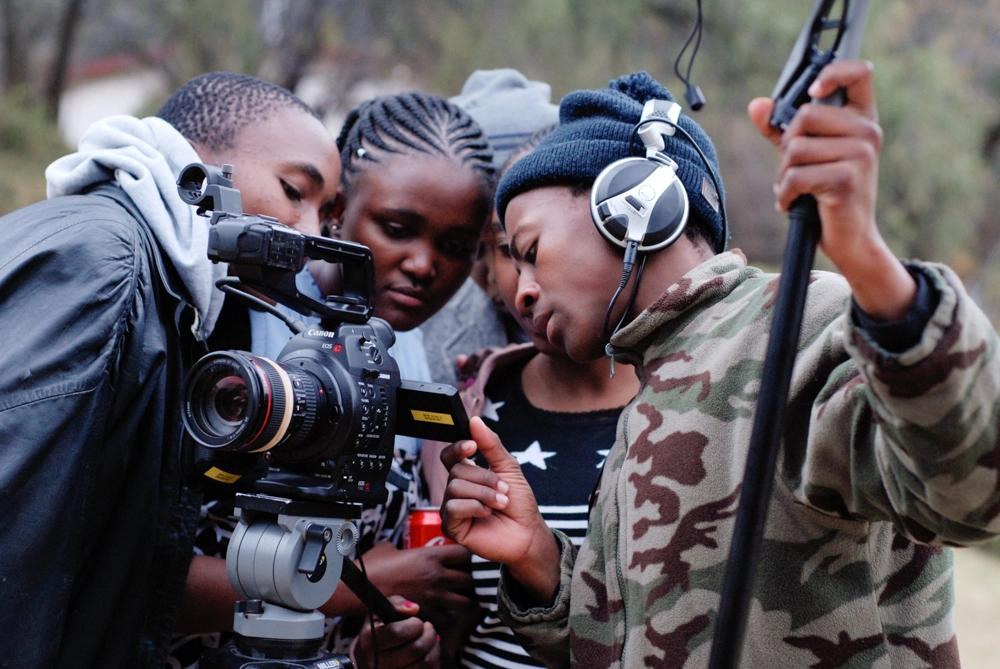
Africa’s vibrant filmmaking scene is gaining global recognition, with stories that challenge stereotypes, celebrate cultural diversity, and inspire change. However, funding remains a significant hurdle for many African filmmakers. Film grants offer a lifeline, providing financial support without the burden of repayment. This guide will walk you through the process of applying for film grants in Africa, offering practical tips, resources, and strategies to help you secure funding for your next project. Whether you are a seasoned filmmaker or an emerging talent, this post will equip you with the tools to navigate the competitive world of film grants.
Why Film Grants Matter for African Filmmakers
Film grants are non-repayable funds awarded to filmmakers to support the development, production, or post-production of their projects. In Africa, where access to traditional financing like loans or investor backing can be limited, grants are a critical resource for bringing stories to life. Organizations like the National Film and Video Foundation (NFVF) in South Africa, Africa No Filter, and Filmmakers Without Borders (FWB) provide funding opportunities specifically tailored to African filmmakers, empowering them to create narratives that resonate locally and globally.
Grants not only alleviate financial constraints but also offer creative freedom, allowing filmmakers to focus on storytelling without commercial pressures. They often align with themes like social justice, cultural exchange, or empowerment, making them ideal for projects that challenge outdated narratives about Africa. By securing a grant, you gain credibility, access to mentorship, and opportunities to showcase your work at festivals or international platforms.
Step-by-Step Guide to Applying for Film Grants in Africa
1. Research Grant Opportunities
The first step in securing film grants in Africa is identifying opportunities that align with your project’s goals, genre, and stage of production. Grants are available for various types of films—narrative, documentary, experimental, and new media—and cater to different phases, from development to post-production.
- Where to Find Grants: Start with regional organizations like the NFVF, which supports South African filmmakers with funding for development, production, and marketing. Africa No Filter’s Last Mile Film Fund offers up to $10,000 for films in post-production that challenge stereotypical narratives about Africa. Filmmakers Without Borders (FWB) provides grants for projects promoting social justice and cultural exchange, open to filmmakers worldwide, including Africans.
- International Opportunities: Look beyond Africa for grants like the Red Sea Fund, which supports African filmmakers alongside Arab and Asian directors, or the Alter-Ciné Foundation, which funds documentaries in Africa, Asia, and Latin America.
- Grant Directories: Websites like FilmDaily.tv and Wrapbook regularly update lists of film grants for African filmmakers, including deadlines and eligibility criteria. Subscribe to newsletters like Creative Money for real-time updates on funding opportunities.
Pro Tip: Create a spreadsheet to track grant names, deadlines, eligibility requirements, and application materials. This helps you stay organized and ensures you don’t miss critical deadlines.
2. Understand Eligibility and Requirements
Each grant has specific criteria, such as geographic location, experience level, or project focus. For example:
- Africa No Filter requires filmmakers to be part of their African Narrative Collective and focus on stories that present nuanced, contemporary perspectives of Africa. Films reinforcing stereotypes (e.g., poverty, corruption) are ineligible.
- NFVF prioritizes South African production companies with a track record or emerging filmmakers with a production company attached. Projects must appeal to South African audiences or comply with co-production treaties.
- FWB accepts applications from filmmakers worldwide but emphasizes themes like empowerment and cultural exchange. Applicants must submit a video essay to showcase their vision.
Carefully review eligibility requirements to ensure your project qualifies. Applying for grants when you don’t meet the criteria wastes time and effort. If you are unsure, contact the grant organization for clarification.
UK Tiktok Creation Blueprint with Monetization tips and Coaching – How to create a U.K. tiktok account
3. Craft a Compelling Application
A strong grant application is your chance to stand out in a competitive pool of African filmmakers. Here’s how to make your proposal shine:
- Develop a Clear Project Vision: Funders invest in stories with a unique perspective. Clearly articulate what makes your film special—whether it’s a fresh take on African storytelling or a character-driven narrative that challenges stereotypes. For example, films like Crip Camp succeeded with funders due to their distinct creative approach.
- Write a Strong Logline and Summary: Your logline should hook the reader in one sentence, summarizing the story and its impact. The project summary should detail the narrative, themes, and why it matters. For Africa No Filter, emphasize how your film contributes to better representation of the continent.
- Include a Detailed Budget: Grant committees want to see that you can manage funds responsibly. Break down your budget into above-the-line costs (e.g., director, writer), production costs (e.g., crew, equipment), and post-production costs (e.g., editing, sound). Be transparent and realistic—funders trust detailed plans.
- Submit a Video Essay or Sample Work: Many grants, like FWB’s, require a video essay to introduce yourself and your project. Use this to convey passion and competence. If submitting sample work, choose a piece that demonstrates strong production value and storytelling. Grant evaluators prioritize quality and professionalism.
- Secure Letters of Recommendation: Letters from established figures in the film industry boost credibility. Choose recommenders familiar with your work and give them ample time to write.
Pro Tip: Use the Non-Fiction Core Application structure as a template for documentary grants. Create a master file and adapt it for each application to save time.
4. Tailor Your Application to the Funder’s Mission
Funders prioritize projects that align with their goals. For instance, Africa No Filter supports films that shift harmful narratives, while FWB focuses on social justice and empowerment. Research the funder’s mission and tailor your application to reflect their values. Highlight how your project advances African storytelling or addresses underrepresented voices.
5. Prepare Supporting Materials
Most grants require additional materials, such as:
- Film Treatment: A detailed outline of your story, characters, and themes.
- Artist Statement: A personal narrative explaining your connection to the project and why you’re the right person to tell this story.
- Portfolio: Showcase previous work to demonstrate your skills and experience.
- Archival Records (if applicable): For documentaries, include a list of archival materials and their costs, supported by quotations.
Ensure all materials are polished, error-free, and formatted according to the grant’s guidelines. A single misspelled word can undermine your professionalism.
6. Submit and Follow Up
Submit your application well before the deadline to avoid technical issues. Keep a record of your submission confirmation. Some grants, like Africa No Filter, notify applicants via their grantmaking platform. If you don’t hear back within the specified timeframe, follow up politely to inquire about your application’s status.
7. Learn from Rejections
Rejections are common in the competitive world of film grants. If your application is declined, request feedback to understand how to improve. Many filmmakers secure funding on their second or third attempt by refining their proposals based on feedback. Persistence is key.
Top Film Grant Opportunities in Africa for 2025
Here are some notable grants to consider:
- Africa No Filter Last Mile Film Fund: Up to $10,000 for post-production of films that challenge stereotypes. Open to African filmmakers and the diaspora.
- National Film and Video Foundation (NFVF): Offers funding for the development, production, and marketing of South African films. Requires a track record or a production company.
- Filmmakers Without Borders (FWB): Supports narrative, documentary, and new media projects with themes of social justice and cultural exchange. Requires a video essay.
- Red Sea Fund: Provides development, production, and post-production grants for African, Arab, and Asian filmmakers.
- Hot Docs-Blue Ice Group Documentary Fund: Offers up to $1 million for African documentary filmmakers, supporting production and development.
SEO Tips for Promoting Your Film Grant Application
To maximize visibility for your project (and future funding opportunities), consider these SEO strategies when creating content about your film:
- Optimize for Keywords: Use keywords like “film grants Africa” and “funding for filmmakers” in your project’s website, social media, and crowdfunding pages. Focus on long-tail keywords like “how to apply for film grants in Africa” to target niche audiences.
- Create a Portfolio Website: Build a professional website showcasing your work, using SEO plugins like Yoast to optimize titles, meta descriptions, and sitemaps. Include a blog with grant application tips to attract fellow filmmakers.
- Leverage Social Media: Share updates about your project on platforms like X, linking to your portfolio or crowdfunding campaigns. Use hashtags like #AfricanFilmmakers and #FilmGrants to reach wider audiences.
- Build Backlinks: Collaborate with film blogs or festivals to feature your work, generating backlinks that boost your site’s SEO ranking.
Common Mistakes to Avoid
- Incomplete Applications: Missing documents or unanswered questions can lead to automatic rejection. Double-check all requirements.
- Generic Proposals: Tailor each application to the funder’s mission instead of using a one-size-fits-all approach.
- Ignoring Deadlines: Late submissions are rarely accepted. Plan ahead to meet deadlines.
- Weak Sample Work: Poor-quality samples can undermine your application. Invest in polished, professional work.
Conclusion
Applying for film grants in Africa requires thorough research, meticulous preparation, and unwavering persistence. By identifying the right opportunities, crafting compelling applications, and aligning your project with funders’ missions, you can increase your chances of securing funding. Grants from organizations like Africa No Filter, NFVF, and FWB empower African filmmakers to tell authentic, impactful stories that resonate globally. Combine your grant efforts with smart SEO strategies to amplify your project’s visibility and attract further support.
Start today by researching grants, organizing your application materials, and refining your story. With dedication and a clear vision, you can turn your filmmaking dreams into reality, contributing to the rich tapestry of African storytelling.
Discover more from Daily Media NG
Subscribe to get the latest posts sent to your email.


Business4 months ago
Social Media + Website: How Nigerian Small Businesses Use Both Together to Win More Customers

Education4 months ago
Introducing Modebills: The Ultimate All-in-One School Management Ecosystem

Education4 months ago
Igniting Futures: The ModeCodersClub Story

Business4 months ago
How a Website Helped My Niger Delta Business Attract Corporate Clients in Nigeria

Business5 months ago
Why Nigerian Businesses Are Losing Customers Without a Website — And How to Fix It

Education5 months ago
The Transforming Power of Education: Digital Education Transformation in the Niger Delta and Beyond

Career4 weeks ago
From Oil Fields to Mind Fields: How Digital Skills Initiatives Can Power Nigeria’s Next Economy
Business2 months ago
Digital Skills and Entrepreneurship: The Twin Engines Africa Needs

Business3 months ago
Akara Won’t Build Nigeria’s Future

Entertainment7 years ago
GOTV Customer Care Line, Emails, Whatsapp, Phone numbers, Website

Business6 years ago
How to Start Charcoal Export business in Nigeria

Entertainment7 years ago